TASKHIVE FREEMIUM TO PAID PROJECT
Conversion Rates, Triggers and Barriers, Conversion Strategies
2025
Product Analytics
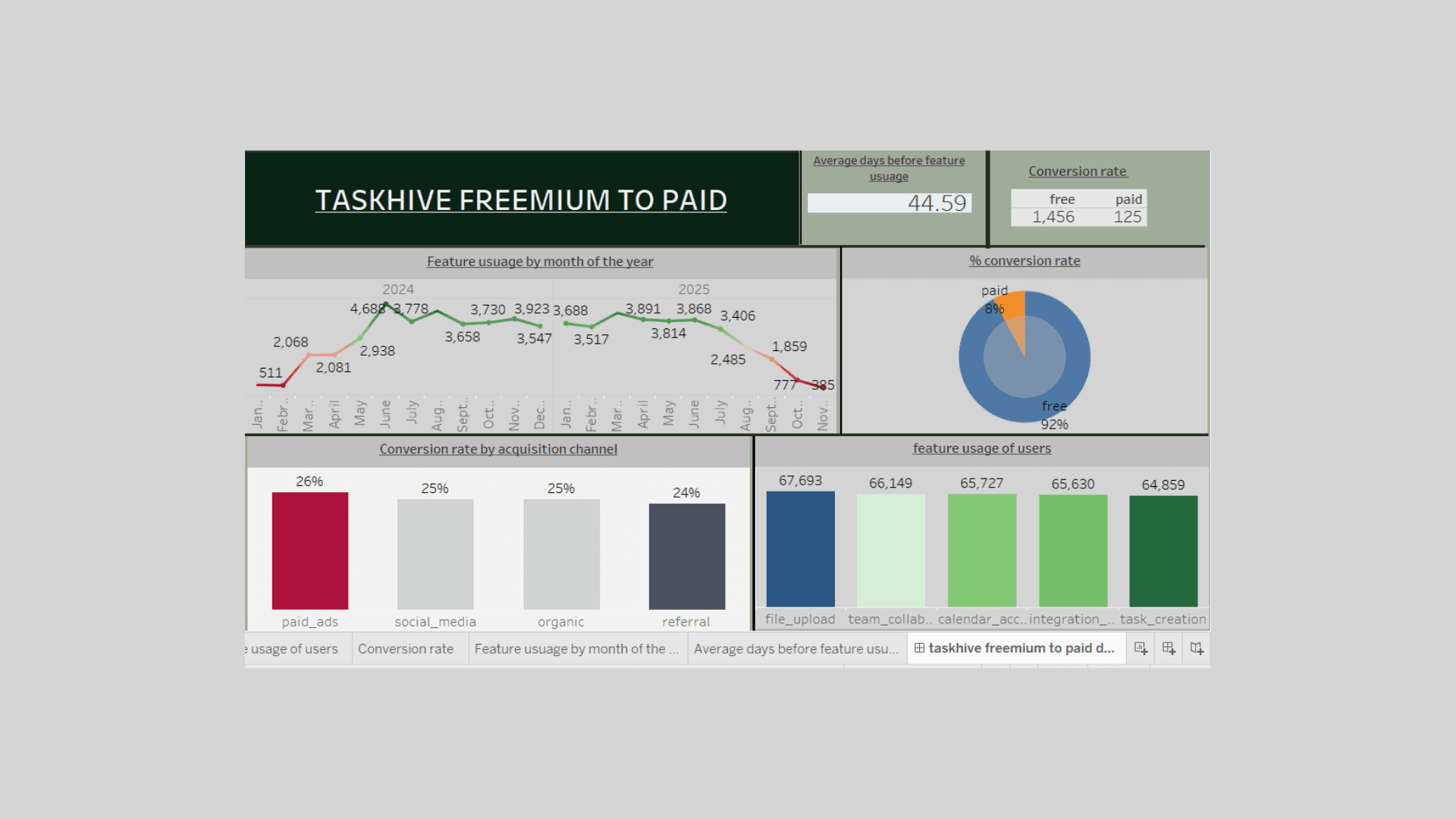
Project info
Company Name:
TaskHive
Company Overview:
TaskHive is a growing SaaS startup that provides a collaborative productivity platform for individuals and small teams. Its freemium product helps users manage projects, create task boards, track deadlines, and integrate with popular tools like Google Drive and Slack.
Core Features:
Task Boards (Kanban-style)
Calendar & Deadline Reminders
Team Collaboration Tools
File Attachments & Comments
Integrations with external platforms (Slack, Google Drive, Trello)
Business Model:
Freemium Tier:
Access to basic task boards
Limited file storage
2 collaborators max
Limited integrations
Paid Plan (TaskHive Pro):
Unlimited boards and storage
Up to 20 collaborators per project
Priority support
Advanced analytics and reporting
All integrations enabled
Current Problem:
TaskHive is struggling with low freemium-to-paid conversion rates (~3%). Despite strong user acquisition and engagement with core features, most users remain on the free plan indefinitely. Leadership wants to identify:
What behaviors or usage patterns signal a higher likelihood to convert
Which features are most commonly used by paying users
How to improve conversion with data-backed feature, pricing, or UX changes
Main Business Problem
Low conversion rate (~3%) from freemium to paid users on our product.
Key Analytical Questions
1. Conversion Overview
What is the overall conversion rate?
What is the average time to conversion for users who upgrade?
What is the distribution of conversions by acquisition channel?
2. User Behavior Analysis
What features are used most by paid vs. free users?
Do paid users use more features or use them more frequently than free users?
Is there a minimum feature usage threshold or pattern before a user converts?
3. User Segmentation
Are there user segments that convert at higher rates?
4. Feature Impact
Which features are most correlated with conversions?
Do users who convert interact with premium features earlier or more frequently?
5. Retention & Engagement
What is the retention rate for free vs. paid users?
How active are free users who never convert vs. those who eventually do?
Key Metrics to Track
Conversion Metrics
Conversion Rate = (Number of Paid Users / Total Users) × 100
Time to Convert = Average days from signup to conversion
Conversion Rate by Channel = Conversion by each acquisition source
Feature Usage Metrics
Feature Adoption Rate = % of users using each feature
Average Feature Usage Count per user type (free vs. paid)
Top Features Among Paid Users = Ranked by usage count
User Engagement Metrics
Daily/Weekly Active Users (DAU/WAU) by user type
Avg. Usage Days Before Conversion
Cohort Metrics
Monthly Signup Cohort Conversion Rate
Retention Curve = Percentage of users active over time by cohort
Data Overview
1. taskhive_users
This table contains user-level demographic and account data, including subscription status and acquisition information.
Column Name | Description |
| Unique identifier for each user |
| Date the user registered on the platform |
| User status: either |
| Date the user upgraded to a paid plan (null if still on free plan) |
| How the user found TaskHive: |
Row Count: 2,200 users
Paid Users: ~8% of total users
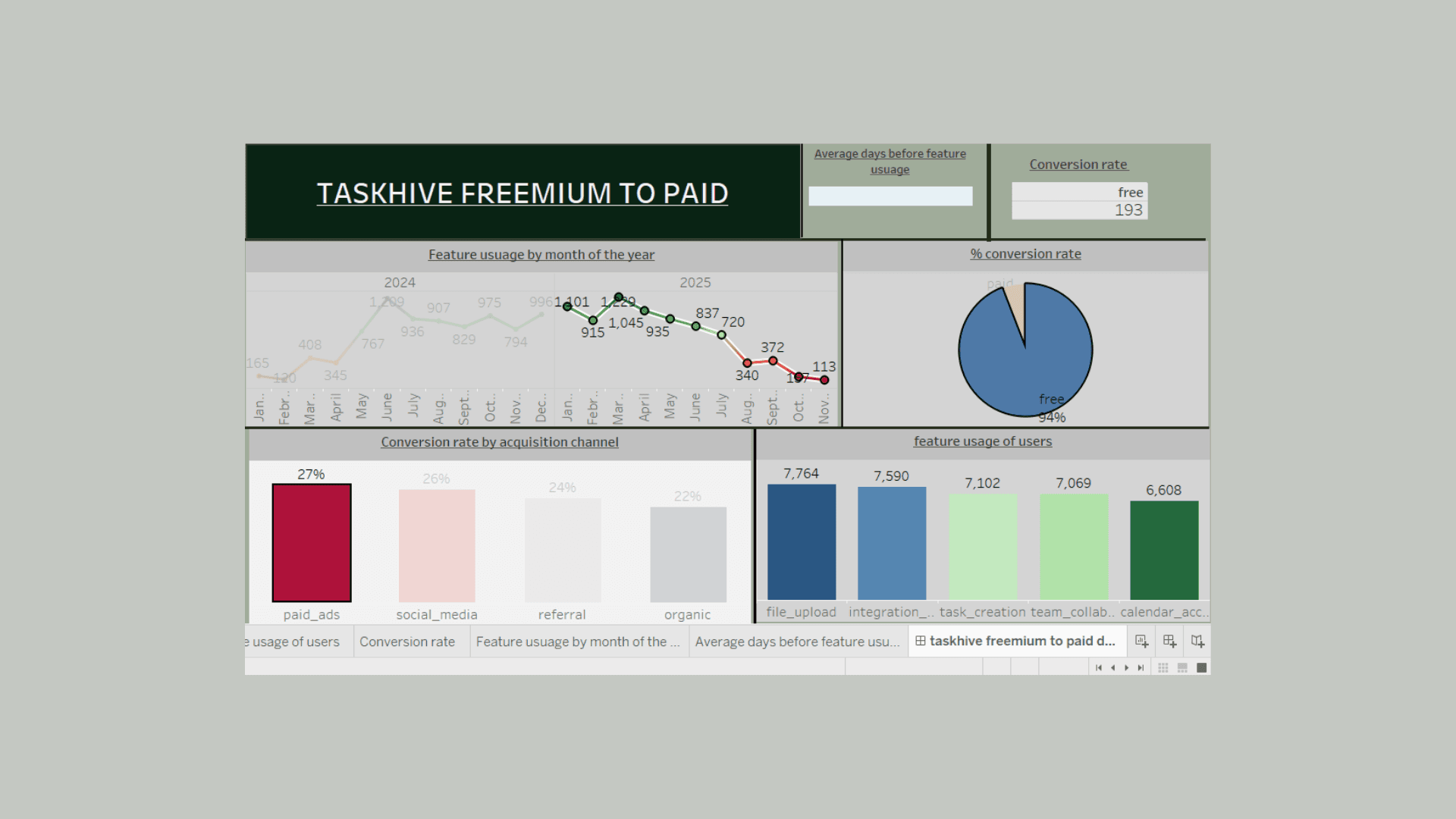
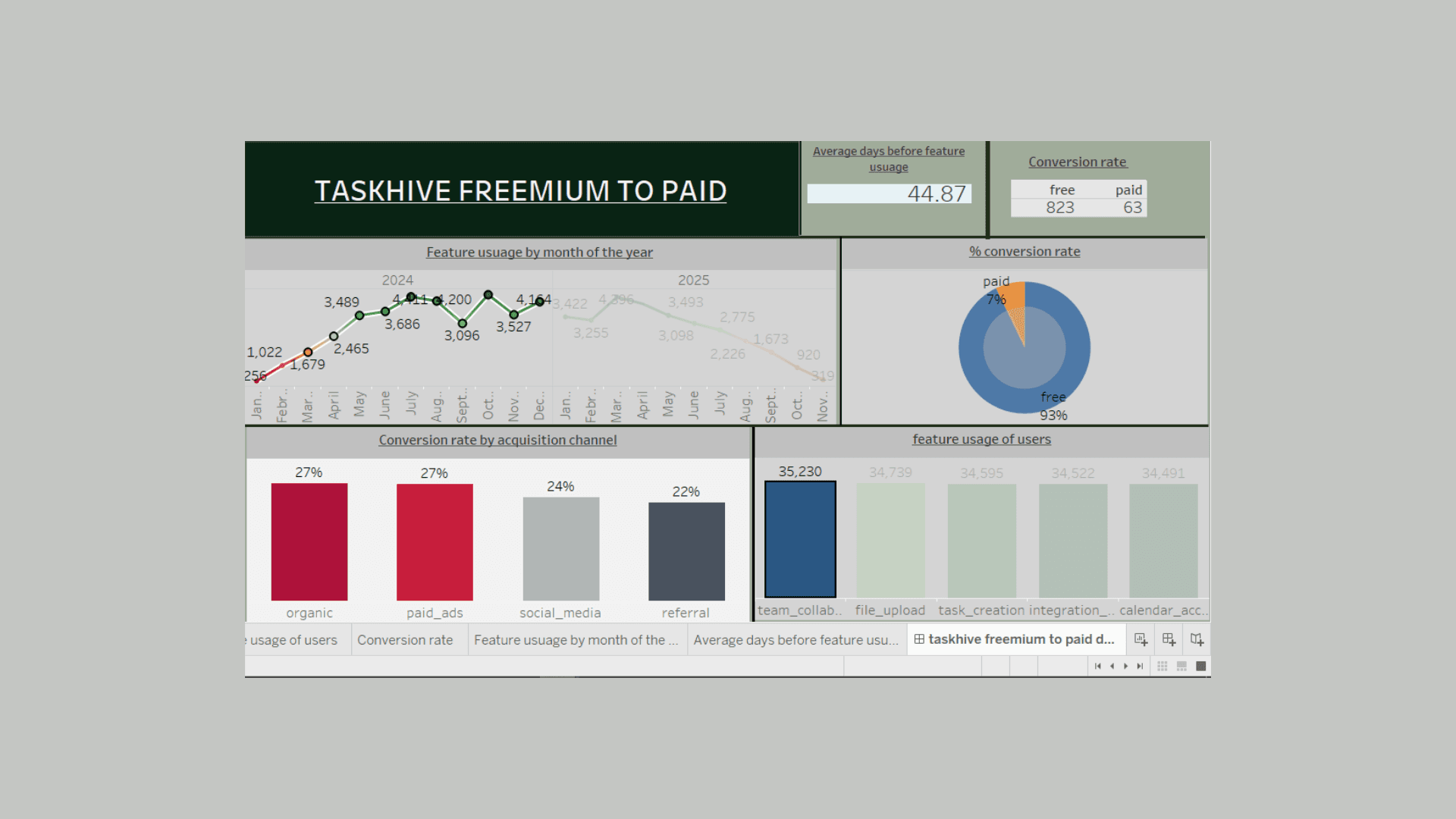
Free Users: ~92% of total users
2. taskhive_feature_usage
This table logs interactions between users and various features within the app, tracking engagement over time.
Column Name | Description |
| Foreign key linking to the |
| Name of the feature used ( |
| Number of times the feature was used on the given day |
| The date on which the feature was used |
Row Count: ~13,000+ rows
Features Tracked:
task_creationfile_uploadcalendar_accessteam_collaborationintegration_used
SQL Analysis Findings & Insights
1. What is the overall freemium-to-paid conversion rate?
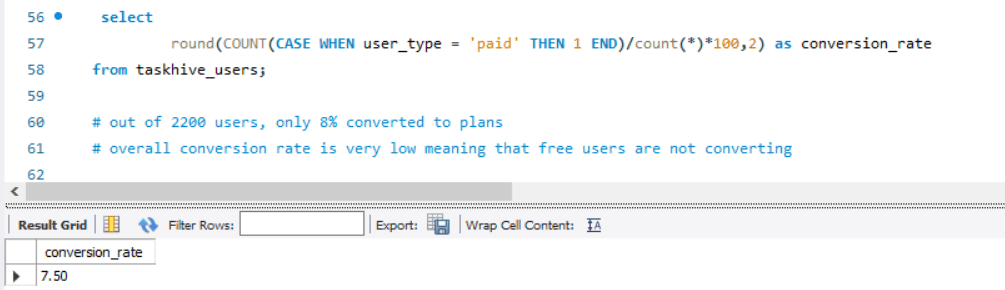
Insight:
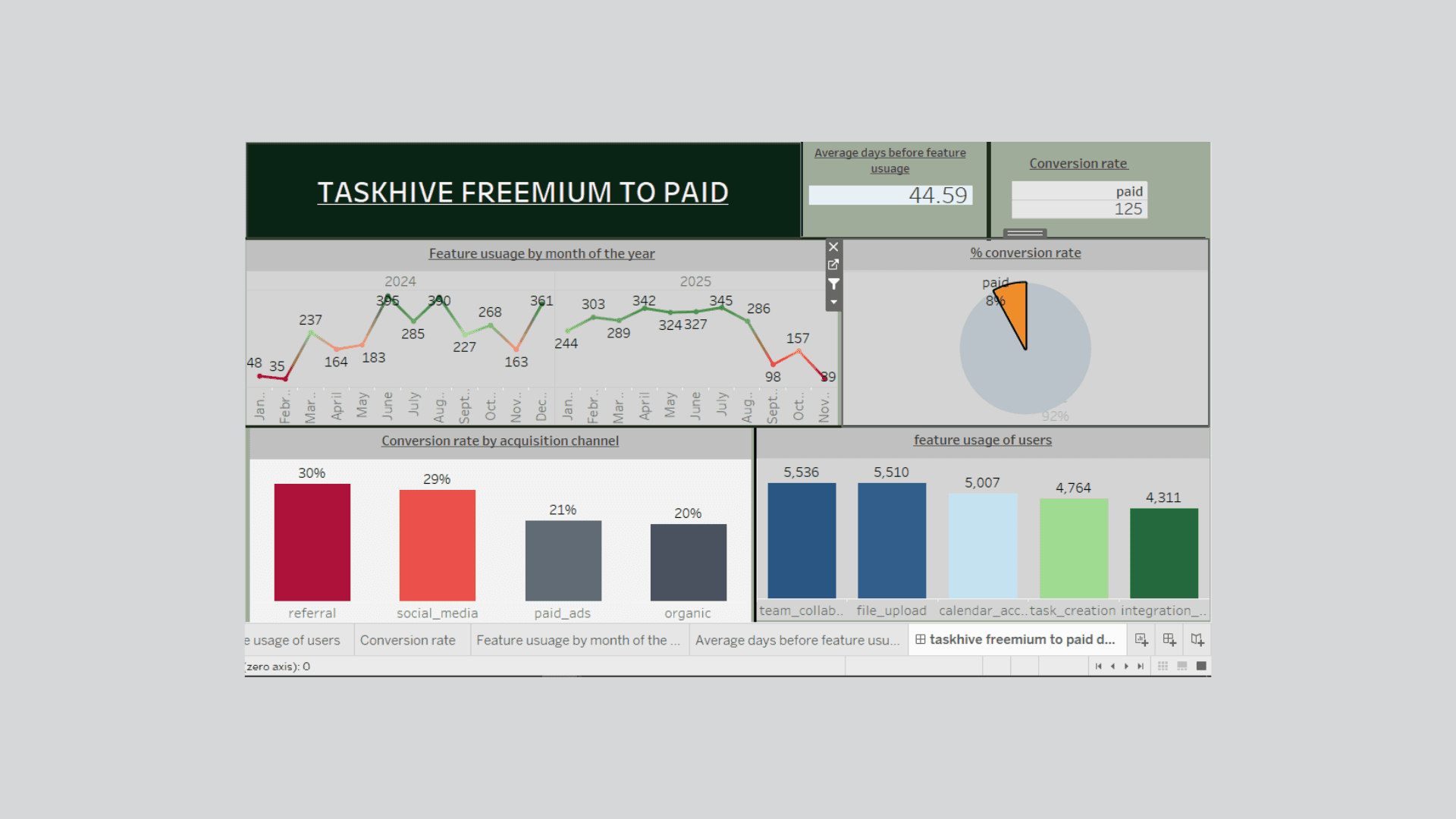
Out of 2,200 users, approximately 8%(165) converted to paid plans — confirming TaskHive's concern about low conversion rates.
2. Which acquisition channels drive the most conversions?
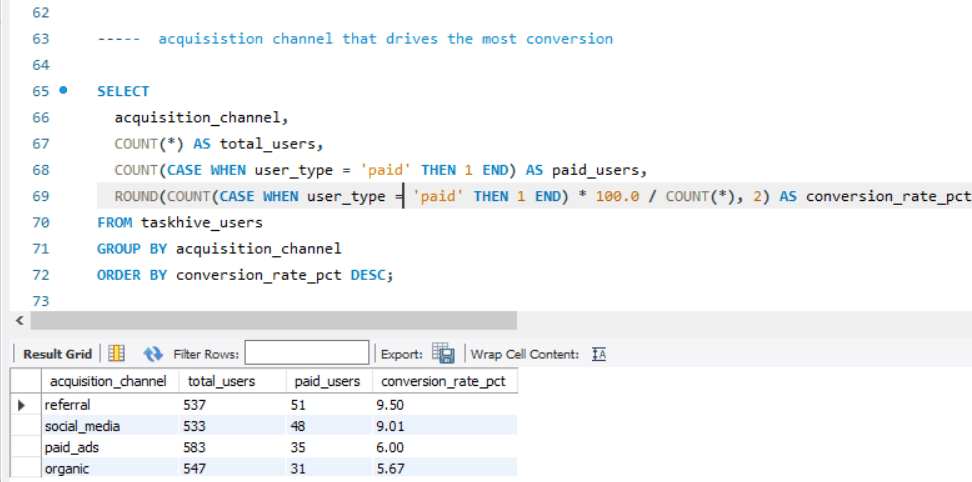
Insight:
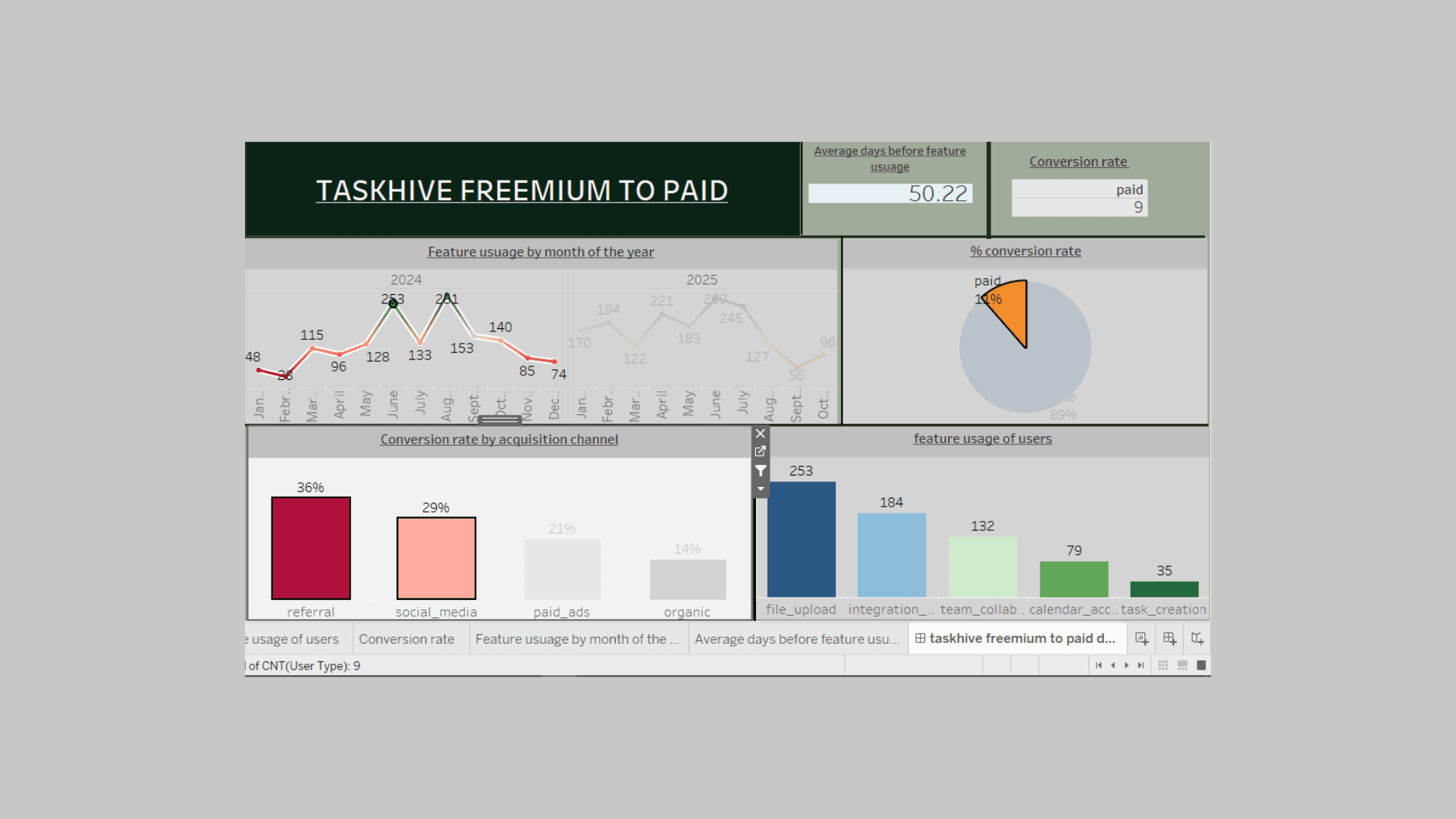
referral and social media rakes in the highest conversion ratespaid ads and organic brings in volume but low conversion showing a high friction between quantity and quality
3. How long does it typically take a user to convert?
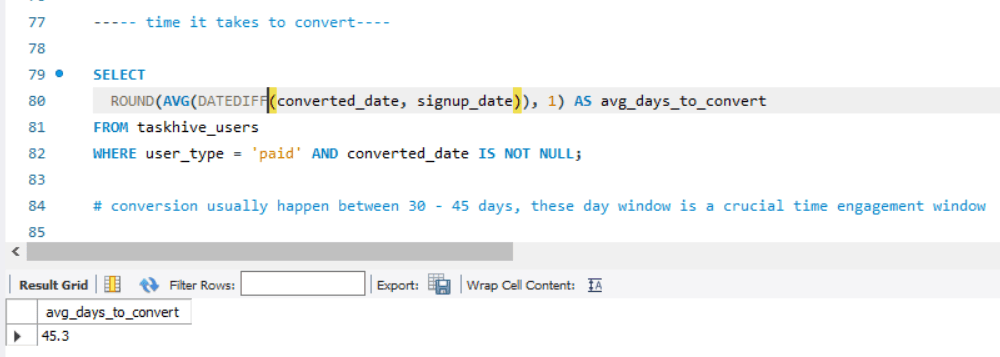
Insight:
Paid users typically convert within 30–45 days after signup. This is a critical engagement window.
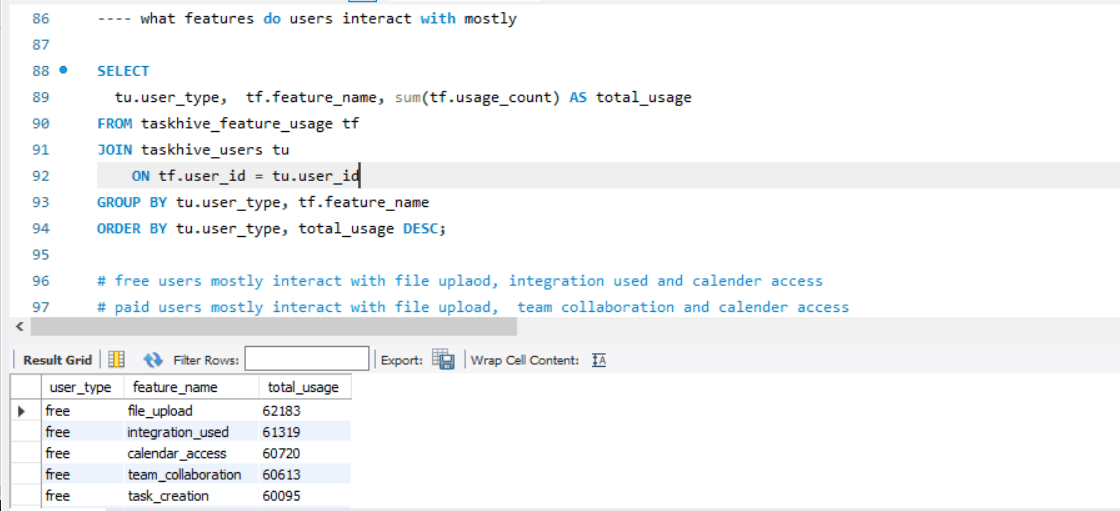
4. What features are most used by paid users vs. free users?
Insight:
Free Users mostly use
file upload, integrationandcalendar_access.Paid Users heavily use
file upload,team_collaboration, andcalendar_access
Suggests file upload,team_collaboration, and calendar_access
are premium value drivers.
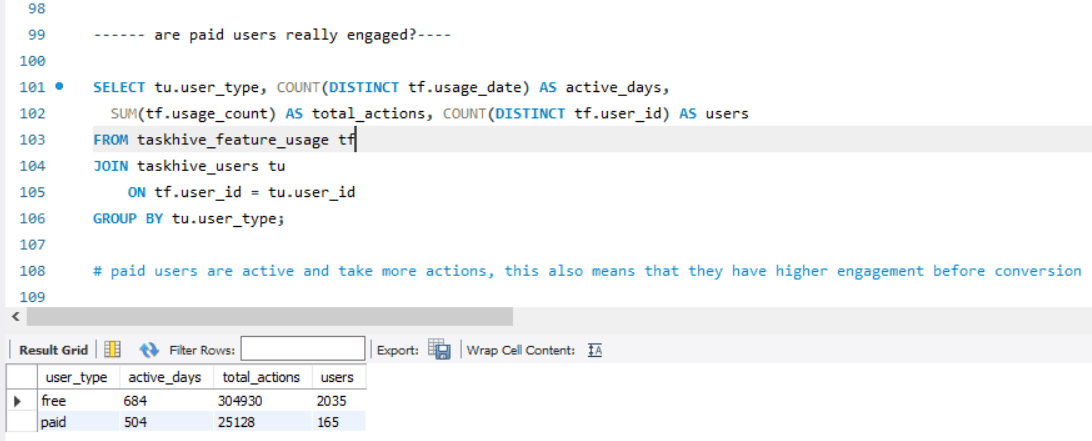
5. Are paid users more engaged overall?
Insight:
Paid users are more active and take more actions per user.
They exhibit higher engagement even before converting.
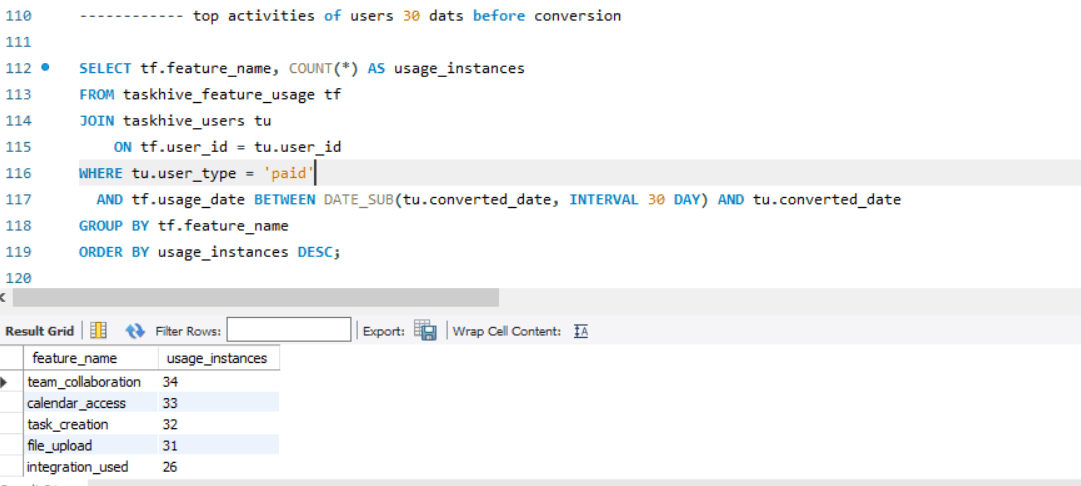
6. Top features used in the 30 days before conversion
Insight:
In the 30 days leading up to conversion, the most-used features are:
team_collaborationCalendar accessTask creationThese can be emphasized in onboarding or upsell nudges.
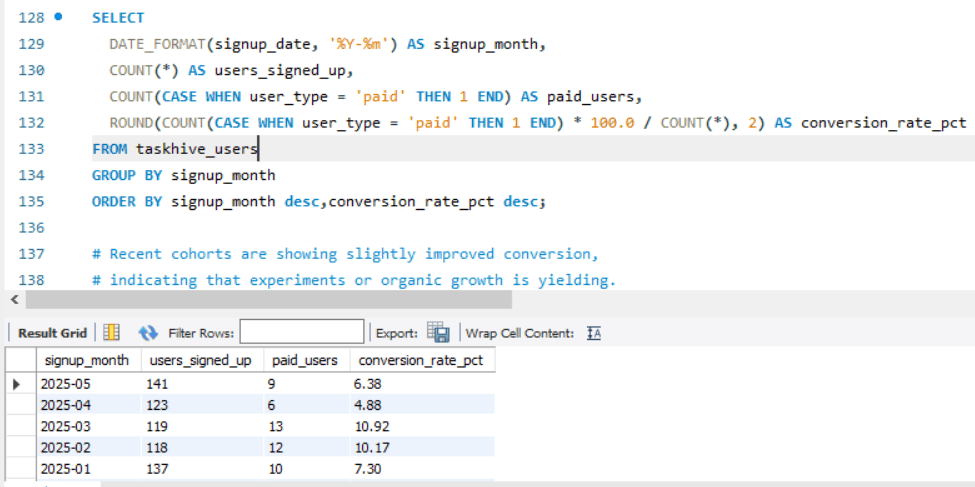
7. Which month had the highest conversion rate (Cohort Analysis)?
Insight:
Recent cohorts (especially the last 3 months) are showing slightly improved conversion, indicating potential impact from ongoing experiments or organic growth.
Key Takeaways
High-value features like
file upload,team_collaboration, andcalendar_accessdrive conversion.Referral and social media channels bring higher-converting users.
Engagement in the first 30–45 days is critical.
Free users who never convert tend to underutilize advanced features.
June - July is the month with the highest conversion rate making it a crucial month to increase product awareness and engagement.
Business Recommendations for TaskHive Stakeholders
1. Double Down on High-Impact Features in the Free Tier Experience
Insight: Paid users engage heavily with features like file upload,team_collaboration, and calendar_access prior to upgrading.
Recommendation:
Make these features more discoverable to free users through in-app nudges or tutorials.
Allow limited access or trial usage (e.g., “3 free team collaborations”) to trigger value perception.
2. Optimize Onboarding for the First 30–45 Days
Insight: Most conversions happen within 30–45 days of signup.
Recommendation:
Introduce goal-oriented onboarding workflows that push users to adopt premium features early.
Launch automated email/SMS onboarding sequences with engagement triggers based on behavior.
3. Reallocate Marketing Budget Toward High-Converting Channels
Insight: referral and social media users convert at significantly higher rates than paid_ads.
Recommendation:
Shift budget from underperforming paid channels to referral programs and SEO/content marketing using high converting social media platforms.
Enhance referral rewards and incentivize power users to invite collaborators.
4. Experiment with Pricing & Upsell Strategy
Insight: Some users show high feature engagement but still don't convert.
Recommendation:
Introduce usage-based nudges, e.g., “You’ve collaborated with 3 users – upgrade for more.”
A/B test offering discounted trials, limited-time upgrades, or flexible pricing tiers.
5. Build User Segmentation for Personalized Outreach
Insight: Not all free users are the same — some are more active and show higher intent.
Recommendation:
Segment users into buckets: low activity, exploratory, and high-intent based on engagement.
Use targeted messaging: e.g., product updates for explorers, conversion incentives for high-intent users.
6. Track Feature Impact and Conversion Cohorts Continuously
Insight: Feature usage and cohort performance vary over time.
Recommendation:
Set up automated dashboards to monitor:
Conversion rates by acquisition channel
Feature usage heatmaps
Retention curves by signup cohort
Use these for ongoing optimization and product iteration.
Summary for Stakeholders:
Area | Actionable Recommendation | Business Goal |
Product Experience | Expose high-value features earlier | Increase feature awareness |
Onboarding | Focus on 30–45 day activation window | Improve conversion timing |
Marketing | Invest in high-converting channels | Maximize CAC-to-LTV efficiency |
Pricing Strategy | Test upsells and freemium limits | Capture users showing high intent |
Segmentation | Personalize outreach based on behavior | Improve campaign effectiveness |
Analytics | Automate tracking and visualization | Enable data-driven decisions |
Next Line of Action: Analysis to Execution processes
Immediate (0–2 weeks) — Quick Wins & Planning
Run a Feature Trial Campaign
Allow free users limited access to premium features (e.g., “Try 3 team collaborations”).
Measure engagement uplift and trial-triggered conversions.
Activate Onboarding Improvements
Add contextual prompts inside the app for high-value features.
Launch automated onboarding emails highlighting premium feature benefits.
Refocus Marketing Spend
Pause low-ROI paid ads.
Boost referral program visibility and double rewards for a limited period.
Mid-Term (2–6 weeks) — Optimize & Test
Segment Users for Targeted Communication
Build engagement-based user segments (low, medium, high).
Send tailored upsell or reactivation messages per segment behavior.
A/B Test Pricing & Offers
Test: discounted first month, extended trial, or new mid-tier plan.
Analyze which pricing experiments yield better conversion and LTV.
Launch a Cohort Conversion Dashboard
Track signup cohorts, conversion timelines, and feature usage trends in real time.
Make this dashboard accessible to Product, Marketing, and Growth teams.
Long-Term (6+ weeks) — Scale What Works
Product-Led Growth Loop
Encourage team invites and integrations to drive collaboration-led virality.
Incentivize invited users to explore premium features early.
Feature Usage Scoring Model
Use past data to score likelihood to convert based on behavior.
Feed this model into CRM to prioritize leads for sales or messaging.
Optimize Acquisition Channels
Based on cohort performance, invest in SEO, referrals, and influencer partnerships.
Reduce CAC while maintaining or increasing conversion rates.
view dashboard here
view project presentation here